
Scared to Buy the Dip, Afraid to Sell Too Soon? A Plain-English Guide to Crypto DCA Bots and DCAUT
Scared to Buy the Dip, Afraid to Sell Too Soon? A Plain-English Guide to Crypto DCA Bots and DCAUT
Published on: 10/10/2026

If you've traded crypto for a while, you've probably been here: the price keeps sliding, and you want to buy the dip but you're afraid of catching a falling knife. Then it finally bounces, and you want to take profit but you're afraid of selling too early. You watch the chart past midnight, and in the end, what actually presses the button is the emotion of that one moment.
That's exactly the problem a trading bot is built to solve: decide when to buy, how much to buy and when to sell ahead of time, write it down as rules, and let a program carry them out. The rules don't drift while you sleep. This guide explains in plain English what DCAUT is, how to use it and what it costs. The last part also covers how to keep using PREMIUM long-term without paying once your trial ends.
What is DCAUT? DCAUT is a crypto trading bot platform and also a trading bot marketplace. You connect your own futures account on Binance, Bybit, OKX or Bitget through an API, and then there are two ways to use it: subscribe to bots that other people have already run live on the Bot Plaza, or set up your own DCA strategy, backtest it and then launch it. Your DCAUT trading bot places orders in your own exchange account. Your funds stay on the exchange the whole time; DCAUT never touches your money and doesn't need withdrawal permission.
Only USDT perpetual futures are supported for now, so strictly speaking, DCAUT is a DCA futures bot platform. Its core strategy is Enhanced DCA: when the price falls, it buys in batches spaced according to recent market volatility, buying more with each step to pull the average cost down, much like what's often called a martingale bot. When the price climbs back above the cost line, it takes profit according to its rules, and once a round is complete, it starts again. With DCAUT auto trading, the whole cycle runs on its own, with no manual orders needed.

What DCAUT is not
The first time people hear they need to connect their exchange API to a platform, the first reaction is usually: could my money be moved out? That's a perfectly reasonable worry. So before getting into how it works, let's clear up three things.
DCAUT is an automated trading tool, but it is none of the three things below.
- · Not custodial wealth management. You never deposit money into DCAUT, and your assets stay in your own exchange account. DCAUT only receives an API key used for placing orders. If you leave withdrawal permission unchecked when creating it, the platform has no way to move your coins.
- · Not copy trading. Copy trading usually mirrors every position a specific trader opens and closes. On the Bot Plaza, you subscribe to a strategy configuration that was locked when it was listed. The bot makes its own decisions and places its own orders in your account according to those rules; subscribers can neither see nor change the parameters. So your entry timing and fill prices will differ from the author's, and so will your results.
- · Not an exchange. DCAUT doesn't match trades or hold assets. Orders, fills, trading fees and funding rates all happen on the exchange you connect. DCAUT is a tool for placing orders and managing auto trading bots.
How it works: connect an API, pick a strategy, backtest, launch
Bot trading on DCAUT takes four steps. Each step comes with screenshots, so you can simply follow along. Of the four, the one most worth your time is step 3: backtesting. First, sign up: go to the sign-up page from the DCAUT website (dcaut.com), enter your email and the verification code, and set a password. You can also log in directly with Google or Telegram. Signing up is free.

1. Connect your exchange
Go to "API & Account", click "Add New API" and choose your exchange. The panel states two ground rules at the top: API keys are stored encrypted and only trading permission is requested; and currently only USDT perpetual futures are supported.

There are two ways to connect. "Quick Connect" uses the exchange's official OAuth authorization, so you don't have to copy and paste any keys, and it's the method the platform recommends. "Manual Connect" means creating an API key yourself on the exchange and pasting it in, which suits people who prefer to manage permissions themselves: enable futures trading permission only, leave withdrawal permission off, and add the server IP the platform provides to the whitelist.
Not familiar with APIs? No need to worry. Quick Connect works like signing in to a website with your Google account: a few clicks to authorize and you're done, without ever touching a key.

2. Pick a strategy
Strategies come from two places.
The first is the Bot Plaza. It lists bots that other users have run live. To find the best DCA bot, you can sort by return, drawdown, days live or price, or browse the newest listings. Listings are split into two types: Single Bot and Bot Portfolio.
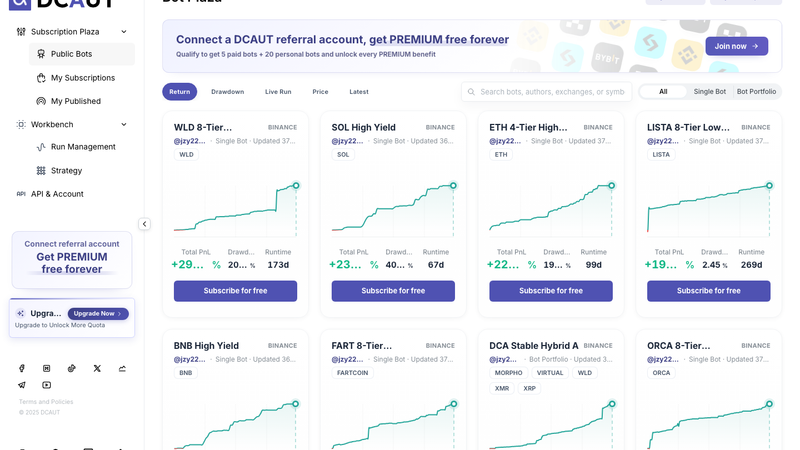
Open any card to see the live equity curve, max drawdown, days running, realized and unrealized PnL, number of entries, plus current positions and activity. The numbers on the Bot Plaza are live records from the author's own account and don't mean you'll get the same results after subscribing.
When choosing, don't just go for the top of the returns ranking; look at drawdown and days live too. A bot that has run for a long time with steady drawdowns usually lets you sleep better than one with eye-popping short-term returns.

The second is building your own. Open the strategy workspace under "My Strategies". On the left, "Best Practices" holds the official presets; click "Load" to fill the whole parameter set into the form on the right. You can adjust how many multiples of volatility set the spacing between entries, which entry conditions each order is tied to, how big each order is, how to take profit, and when to stop adding. Configuration is all forms and tables, with no coding.
The easiest way to set up your first strategy: load an official preset, leave every parameter as it is, and backtest it right away to see how it would have done in past markets. Once you're comfortable, adjust one thing at a time, and you'll gradually learn what each parameter does.

For the full rules behind each step, such as why the bot doesn't necessarily buy even when the price reaches a level, or what it means when the last order is filled, see the strategy page "How the Enhanced DCA (Counter-Trend Averaging) Strategy Works".
3. Backtest first
Think of a backtest as a dress rehearsal: the strategy runs through real past market data first, so you can see how it makes money when things go its way, and how painful it gets when they don't.
In the "Backtest Controller" below the workspace, choose a trading pair, time range, initial capital and risk coefficient (essentially the leverage multiple), then click "Backtest". Backtests are driven by historical 1-minute candles, include trading fees and funding rates by default, and share the same signal code as live trading.

The chart above is a backtest of the official preset "Top 20 Mainstream Stable DCA Strategy" on the ETHUSDT perpetual, from 2025-01-01 to 2026-10-10, with 1,000 USDT initial capital and a 5x risk coefficient. When you're looking for the best futures trading bot, returns alone won't tell you. With results like these, look first at the three charts for drawdown, position layers and margin usage, and only then at the DCA bot profit figures. In this period, position layers peaked at 8/8 and margin usage peaked at 987.71 USDT. In other words, at the deepest point all 8 orders were filled and the margin was almost fully used. A backtest that runs to the end doesn't mean the strategy will hold up live.
Honestly, what we most want you to notice in this chart isn't the return. It's that 8/8. The real value of a backtest is that it shows you what the toughest moment looks like before you put real money in, so you can judge whether you could live through it.
Free accounts get 10 backtests a day, with a maximum range of 90 days each; a 21-month range like the one above requires PREMIUM or higher.
4. Launch the bot
Happy with the backtest? Click "Launch Bot", name the bot, and choose the strategy, exchange account, trading pair and initial capital. The pop-up shows your available balance and the minimum initial capital this parameter set requires; you can't launch below that minimum.

Once your crypto DCA bot is running, you can check positions, layers, PnL and every single order under "Run Management". There are three ways to stop it: "Pause Now", "Market Close and Pause", and "Pause When Flat". You don't need to watch it constantly once it's running, but when the market gets really volatile, it's still worth opening "Run Management" for a quick look.
The free plan can't run live bots. To launch one, you need a paid membership, the new-user trial, or the referral-account PREMIUM described below.
Supported exchanges
DCAUT currently supports four exchanges. Whether you want to run a Binance trading bot, an OKX trading bot, a Bybit trading bot or a Bitget trading bot, you set it up and manage it in the same DCAUT dashboard.
All four exchanges work the same way:
- · Exchanges: Binance, Bybit, OKX and Bitget
- · Product: USDT perpetual futures
- · Connection method: Quick Connect (OAuth) or manual API key
Spot isn't supported yet, so what you run on DCAUT is a Binance futures bot, a Bybit futures bot and the like. Some exchanges have account-type requirements, so when connecting, follow the in-app API setup guide for that exchange.
List your own bot
Been running a bot for a while and think your parameters are pretty good? There's room for you on the Bot Plaza too. DCAUT's plaza isn't only for official bots. Any user whose bot has run live for 30 days can list it under "My Published". That's why DCAUT is called a crypto bot marketplace: some people publish, others subscribe.

Click "Publish Subscription", choose Single Bot or Bot Portfolio, enter a name and description, select the bot to list, then choose a monthly subscription price (for example, $5.90 or $9.90 per month). There are two rules: you can only choose bots that have run live for more than 30 days, and all bots in a portfolio subscription must be on the same exchange.
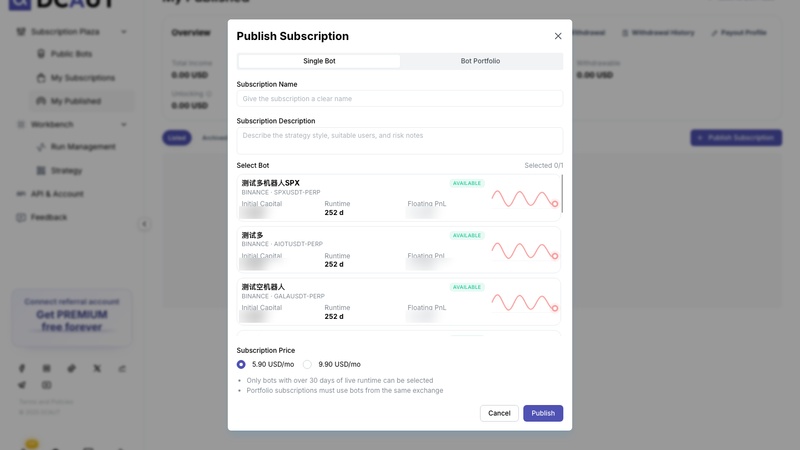
Once listed, the parameters are locked. Subscribers can see live performance and positions, but they can't see or change the parameters. Subscription income is recorded under "Total Income" in "My Published", and you can request a withdrawal.
What's free, and how the paid plans differ
Let's get the money part out of the way. The prices and limits below are taken from the subscription plans page on October 10, 2026. Prices are in US dollars.
- · Free: $0. 10 backtests a day, 3 saved strategies, no live bots, 90-day max backtest period, basic indicator library and official presets, no strategy import/export.
- · PLUS: $49/month, or $41.59/month billed annually (save $89 a year). 20 backtests a day, 10 saved strategies, 5 running bots, 5,000 USDT total initial capital, 365-day max backtest period, basic indicator library and official presets, strategy import/export, millisecond low-latency order execution.
- · PREMIUM: $99/month, or $83.25/month billed annually (save $189 a year). 100 backtests a day, 30 saved strategies, 20 running bots, 50,000 USDT total initial capital, 2-year max backtest period, advanced indicator library and official presets, strategy import/export, millisecond low-latency order execution.
- · ULTIMATE: $199/month, or $166.59/month billed annually (save $389 a year). Unlimited backtests, initial capital and backtest period, 100 saved strategies, 100 running bots, advanced indicator library and official presets, strategy import/export, the fastest millisecond low-latency order execution.
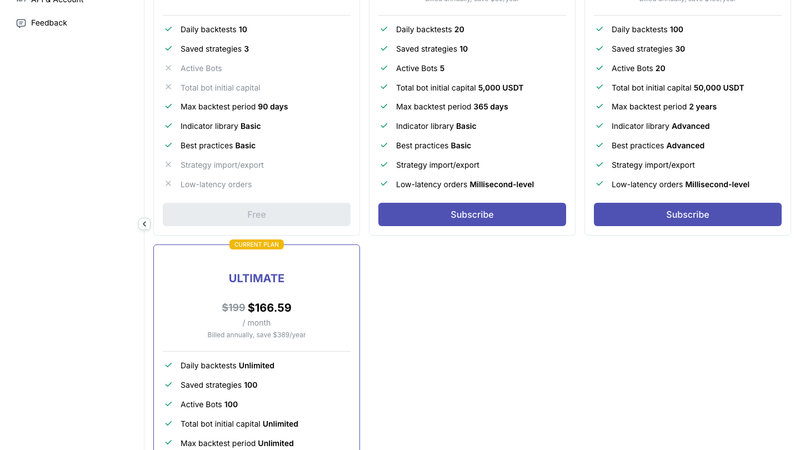
The page shows about 16% off for annual billing. There are two ways to pay: credit or debit card, with auto-renewal; or crypto (BTC, ETH, USDT and others), as a one-time payment without auto-renewal. Also, advanced features such as Trailing Take Profit require PREMIUM or ULTIMATE to run live.
So the free plan is for research, not live trading. Signing up, browsing the Bot Plaza, configuring strategies and running 10 backtests a day cost nothing, but to let a DCAUT bot place real orders, you need a membership.
The order we'd recommend: get comfortable with backtesting on the free plan first, and once you feel confident about a parameter set, then decide whether to pay. There's no rush.
14-day trial
New users automatically get a 14-day membership trial when they complete onboarding and launch their first bot. No card is required, and it's limited to one per account. If you pay during the trial, billing starts on the day the trial ends.
If you don't continue with a membership after the trial, your account returns to the free plan: you can't launch new bots, and bots that are already running move to "Pending Pause", stopping once the current round of positions is complete. They are not force-closed.
The point of the trial isn't to make a certain amount of money in 14 days. It's to let you watch, with a real account and a smaller amount of capital, how the bot adds to positions and takes profit in live trading.
Trial over and don't want to pay? Connect a DCAUT referral account and use PREMIUM free, long-term
If the 14-day trial went well but you'd rather not commit to a monthly payment just yet, this may be the most useful part of the whole article.
When the trial ends, there's a second option besides paying: register an exchange account through DCAUT's referral link, connect it, and you can keep using PREMIUM for free. You'll find the entry point in the banner at the top of the Bot Plaza, or under "Join now" in the sidebar.

It takes three steps:
1. In the "Exchange guide" on the campaign page, pick Binance, OKX, Bybit or Bitget. Register a new account with the referral link on the page (or enter the referral code shown on the page when signing up), and complete the exchange's own identity verification.
2. Back in DCAUT, choose "I already have an account, connect API" and connect that account. Quick Connect is recommended.
3. The platform checks the referral relationship automatically. Your membership usually changes to PREMIUM within 5 minutes; refresh the campaign page to see it.

You get the full PREMIUM package: 100 backtests a day, 30 saved strategies, 20 of your own bots running (50,000 USDT total initial capital), backtest ranges of up to 2 years, plus 5 subscription slots for paid Bot Plaza bots (20,000 USDT total initial capital for subscribed bots).

A few rules that often trip people up, all listed in the campaign page FAQ:
- · The account must be registered through a DCAUT referral. If your identity has already been used to register another account on that exchange, a new referral relationship usually can't be linked. If you still don't have the membership 5 minutes after connecting, this is the most likely reason; try registering on a different exchange.
- · Bots must run on this qualifying API. While you're on complimentary PREMIUM, all subsequent subscriptions and bots can only use the qualifying referral-account API.
- · You can connect multiple APIs at once. As long as you keep at least one qualifying referral-account API, PREMIUM stays active. Delete the last one and the complimentary membership ends immediately.
- · When it ends, it works the same way as a trial expiring. You can't launch new bots or start new subscriptions; bots and subscriptions already running continue until their current position is closed.
- · Existing PLUS or PREMIUM members can join too, and you get whichever tier is higher. ULTIMATE members don't need to join.

Final thoughts
A trading bot won't predict the market for you, and neither will DCAUT. What it can do is keep carrying out the rules you thought through while calm, even when you're not: no hesitation when it's time to add, no greed when it's time to take profit, and no panicked clicking when the market swings wildly in the middle of the night.
If you'd like to give it a try, the easiest path is to create an account, browse the Bot Plaza, then run a backtest with an official preset. None of these steps cost anything. Look at the data, then decide what to do next.
FAQ
Is DCAUT safe?
As far as your funds go, the money always stays in your own exchange account. DCAUT only holds an API key with trading permission; once withdrawal permission is turned off as instructed, the platform has no ability to move your assets. You can add an IP whitelist when connecting manually, keys are stored encrypted, and you can delete the key on your exchange at any time, at which point the bot immediately loses the ability to place orders. But keeping your funds secure doesn't mean you can't lose money, nor does it mean a trading bot will make money: the strategy itself can lose, futures involve leverage, and positions can be liquidated in extreme markets.
How much does DCAUT cost?
Signing up, browsing the Bot Plaza, configuring strategies and 10 backtests a day are free. Running live bots requires a membership: PLUS at $49/month, PREMIUM at $99/month, ULTIMATE at $199/month, with about 16% off on annual billing. New users get a 14-day trial, and if you register an exchange account through a DCAUT referral link and connect it, you can get PREMIUM free long-term. Bot Plaza bots are subscribed to separately each month, at prices set by their publishers.
Which exchanges are supported?
Binance, Bybit, OKX and Bitget, with USDT perpetual futures only. Spot isn't supported yet.
Can DCAUT withdraw my coins? Can I still withdraw them myself?
DCAUT can't withdraw. It only places orders through the API, and the setup guide requires withdrawal permission to be turned off. You withdraw on your exchange as usual; that has nothing to do with DCAUT. Before withdrawing, it's best to stop the related bots first so you don't get liquidated for insufficient margin.
Is DCAUT an AI trading bot?
No. A DCAUT trading bot is a rule-based trading robot that follows preset parameters and conditions: where to add when the price drops, how big each order is, and which signals trigger take-profit or stop-loss are all rules written down in advance, and backtests and live trading use the same signal code. No model is making market calls for you on the fly.
Do I need to know how to code?
No. Many people assume robot trading means you have to program. Not on DCAUT: strategies are configured with forms and tables, and official presets load with one click so you can adjust from there.
If I subscribe to a Bot Plaza bot, will my returns match the author's?
Not exactly. You start running in your own account from the moment you subscribe, so your entry timing, fill prices and initial capital all differ from the author's, and averaging-in strategies like this are especially sensitive to the starting point. Returns and drawdowns on the Bot Plaza are historical records from the author's account and are for reference only.
Risk warning and disclosure
Crypto asset trading is high risk, and you may lose all of your principal. Futures trading uses leverage, and positions may be forcibly liquidated. This article describes platform features and is not investment advice. The backtest screenshots are based on historical data: official preset "Top 20 Mainstream Stable DCA Strategy", ETHUSDT perpetual, 2025-01-01 to 2026-10-10, 1,000 USDT initial capital, 5x risk coefficient, platform default fee of 0.04%, zero slippage, funding rates included. Results are hypothetical and do not represent future returns; live trading may differ from backtests due to liquidity, latency and exchange rules. Returns and drawdowns shown on the Bot Plaza are historical live records from publishers' accounts and do not represent results after subscribing. Prices and membership benefits are subject to what the subscription plans page shows in real time. Screenshots taken on October 10, 2026.